
Kinetic typography is everywhere—yet most of it steals clarity in the name of flair. For SpectrumMediaLabs, motion is not decoration; it’s an attention and comprehension system. Done well, it guides the eye, encodes hierarchy, and compresses time. Done poorly, it hurts reading speed, causes fatigue, and bloats pages.
This playbook explains when to animate text, how to time it, and—critically—when to stop. It includes concrete heuristics, ready-to-ship specs, and QA checklists you can paste into your workflow today.
What motion should do for type (and only this)
Use motion only when it achieves one of these jobs:
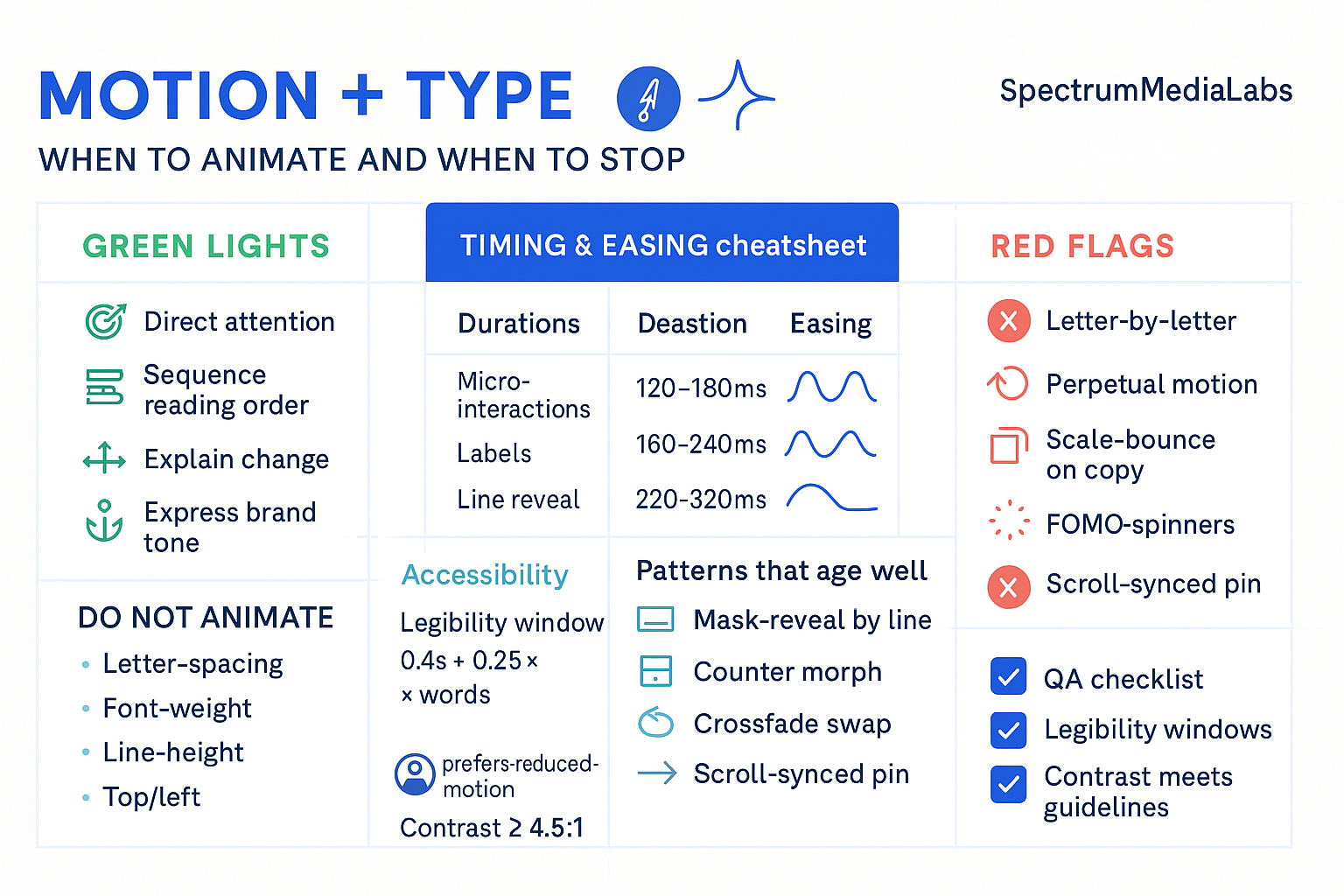
- Direct attention. Pull the eye to a headline or metric during the first 1–2 seconds.
- Sequence reading order. Reveal information in chunks so the user isn’t forced to choose what to read first.
- Explain change. Smoothly bridge state A → state B so users don’t feel lost (filters applied, price updated, step completed).
- Maintain orientation. Preserve the “where am I?” sense during page transitions, modals, and carousels.
- Express brand tone. Subtle spring for playful brands; crisp snap for utilitarian brands. Tone is seasoning, not the dish.
If an animation doesn’t serve one of those, it’s a candidate for deletion.
When to animate text (green lights)
- First-frame hooks. A micro motion that prevents banner blindness: a 6–10px upward ease, a quick opacity rise, or a numeral “count-up” (00 → 27%).
- Chunked reveals. Multi-line headlines that appear line-by-line (not letter-by-letter) to set a reading rhythm.
- Cause & effect moments. Button → confirmation label; filter chip → result count; slider → price label morph.
- Spatial transitions. Cards expanding to detail views where the headline keeps its position/size relationship.
- Data emphasis. Tiny numeric tick for KPIs; gentle glow to show updated figures after a background fetch.
- Captions and lower-thirds. Slide/fade on entry, crossfade on update, slide/fade out. Zero surprises.
When to stop (red flags)
- Letter-by-letter gimmicks. It tanks legibility and looks like a PowerPoint effect. Prefer word or line increments.
- Perpetual motion. Anything that loops after the initial 1–2 seconds (pulses, bobbing, shimmer). Exception: accessibility affordances (e.g., focus rings) which must be subtle.
- Scale-bounce on copy. Scaling text causes reflow and aliasing. If you need emphasis, animate opacity/position or background instead.
- Easing whiplash. Overshoot/bounce on body text reads juvenile and slows scanning.
- FOMO spinners. Loading? Don’t animate the headline; animate a progress affordance near the control.
- Motion fighting motion. If video or b-roll is already moving behind text, keep the text static.
Timing & rhythm: practical numbers that work
Treat these as defaults; tune ±20% to match brand tempo.
Durations
- Micro-interactions (chips, tags, counters): 120–180 ms
- UI text updates (labels, buttons, toasts): 160–240 ms
- Headline/line reveals: 220–320 ms per line
- Section transitions (tab/page change): 280–420 ms
- Modal/overlay entry: 180–260 ms in, 140–200 ms out
Easing (CSS)
- Default UI:
cubic-bezier(0.2, 0.8, 0.2, 1)(fast out, gentle in) - Information emphasis:
cubic-bezier(0.15, 0.9, 0.1, 1) - Dismiss/close:
cubic-bezier(0.33, 0, 0.67, 1)(ease-in-out)
.motion-in    { transition: opacity 220ms, transform 220ms cubic-bezier(0.2,0.8,0.2,1); }
.motion-out   { transition: opacity 160ms, transform 160ms cubic-bezier(0.33,0,0.67,1); }
.reveal-line  { transform: translateY(8px); opacity: 0; }
.reveal-line.is-visible { transform: translateY(0); opacity: 1; }
Legibility window (rule of thumb)
For on-screen text that the user must read, keep it visible for:
≈ 0.4s + (0.25s × number_of_words)
Examples:
- 3 words → ~1.15s
- 7 words → ~2.15s
- 12 words → ~3.4s (probably too long; split the line)
Don’t animate these properties
Avoid animating anything that triggers layout and paint thrash:
- letter-spacing, word-spacing, font-weight, line-height
- top/left (use
transform: translateinstead) - color on large text over gradients (banding, accessibility risk)
Stick to opacity and transform (translate, scale, rotate). They’re GPU-friendly and predictable.
Kinetic type patterns that age well
- Mask-reveal by line
- Each line slides & fades from a shared baseline; total sequence ≤ 900 ms.
- Works for headlines and lower-thirds.
- Counter morph
- Numbers tween from old → new over 300–500 ms with a “snap” ease; commas pop in at the end.
- Great for dashboards and pricing.
- Crossfade swap
- For changing labels (e.g., state toggles), crossfade 120–160 ms; prevent shift with fixed width container.
- Scroll-synced pin
- Lock a key phrase while supportive lines parallax subtly < 8 px.
- Avoid heavy parallax; motion sickness begins fast on mobile.
- Type-on for code/CLI only
- 30–45 ms per character (monospace), cursor blink 500–700 ms.
- Never use with body text or display faces.
Accessibility and ethics of motion
- Respect
prefers-reduced-motion.
Provide a static preset or cut durations by 80–100%.
@media (prefers-reduced-motion: reduce) {
  * { animation: none !important; transition: none !important; }
}
- Contrast & readability. Minimum 4.5:1 for body text; avoid animating behind text.
- Flash safety. Don’t flash overlays >3 times per second.
- Cognitive load. No moving text that the user must read persists beyond 5 seconds; if it must persist (ticker), provide a pause.
Video & social: motion + type for short-form
- First frame matters. Text must be legible at t=0 or within 200 ms.
- Card rhythm: swap on-screen text every 1–2 seconds, max 7 words per card.
- Lower-third template: 16 px vertical motion, 180 ms fade/slide in; 140 ms out.
- Subtitle spec: sentence case, 48–72 px (mobile), safe-area = center 80% of frame.
- Don’t over-animate on top of cuts; let the edit provide energy, keep type simple.
Performance budgets (web)
- Animation cost: Keep combined animated area under 15% of viewport for longer than 1 second.
- Assets: Prefer CSS and Lottie (vector) for small motifs; pre-render WebM/MP4 for complex sequences; always supply a static fallback image.
- Frame rate: 60 fps target, floor 45 fps. If you can’t hit it on mid-range Android, reduce motion distance or duration.
Production specs you can paste
1) React component for line-by-line reveals
export function RevealLines({ lines, delay = 60 }) {
  return (
    <div aria-live="polite">
      {lines.map((line, i) => (
        <p
          key={i}
          className="reveal-line"
          style={{ transitionDelay: `${i * delay}ms` }}
        >
          {line}
        </p>
      ))}
    </div>
  );
}
2) AE/Lottie guidance
- Animate position Y + opacity only.
- Duration per line: 240 ms in, 140 ms out.
- Motion blur off for small sizes; use subtle easeOut(60%).
3) End-card typography (short-form)
- H1 ≤ 7 words, bold, center safe-area.
- CTA button fixed; text doesn’t move after 300 ms.
- Total end-card dwell: 1.0–1.5 s.
Decision tree: animate or not?
- Does the motion guide attention or explain change?
- No → Don’t animate.
- Will the user need to read while it moves?
- Yes → keep motion under 220 ms, then hold static for legibility window.
- Is there already competing motion (video, confetti, carousel)?
- Yes → keep text static.
- Can it run at 60 fps on mid devices and pass reduced-motion?
- No → simplify or remove.
- Does it fit brand tempo?
- Yes → ship; No → retune easing/duration.
QA checklist (ship stopper items)
- All moving text respects
prefers-reduced-motion. - No letter-by-letter reveals (except code demos).
- Animated properties limited to
opacityandtransform. - Headline legibility window met (
0.4s + 0.25s × words). - Contrast ≥ 4.5:1; no motion behind small type.
- 60 fps on test devices; CPU/GPU within budget.
- End-card CTA readable in one glance; no competing motion.
Rollout plan (30/60/90)
Days 1–30 — Baseline & rules
- Publish this spec in your design system: durations, easing, green/red lists.
- Refactor headline/CTA patterns to use line reveals and opacity/translate only.
- Turn on
prefers-reduced-motionsupport across site and video templates.
Days 31–60 — Systematize
- Convert 3 hero modules and 2 lower-thirds to Lottie/CSS with the specs above.
- Build a motion audit: where text moves, why, and which job it serves. Remove at least 30% of gratuitous motion.
Days 61–90 — Optimize with data
- A/B test headline timing (200 vs 300 ms per line) and easing on top pages.
- Track time-to-first-interaction and reading completion. Promote winners to default tokens.

Add comment